Touch vs Touchless Kitchen Faucets: Which Is Better? (October 2026)
Choose a touch faucet if you want to tap the spout; choose touchless if you want to move a hand near a sensor. Some models offer both controls, and a manual handle remains available on each pick here.
On this page (9 sections)
- Touch vs touchless kitchen faucet: how does each work?
- Which control works best with messy hands?
- Who should choose touch activation?
- Who should choose touchless activation?
- How do you choose between the three controls?
- What should you check before installation?
- How do you use and care for an electronic faucet?
- What mistakes should you avoid when choosing?
- Are touch and touchless faucets worth it?
For touch vs touchless kitchen faucets, choose touch if you want to tap the spout with your wrist or forearm, and touchless if you want to move a hand near a sensor. A combination model offers both, while each faucet here also has a manual handle.
The main difference is how you start and stop water. Touch activation responds to contact with the faucet, while touchless activation responds to a hand near its sensor.
Either style can reduce how often you grab the handle with messy fingers. The useful choice comes down to which motion feels natural, how many people share the sink, and whether the faucet's power and mounting needs suit your kitchen.
 Best for simple touch control
Delta Essa Touch Pulldown (Brushed Nickel)
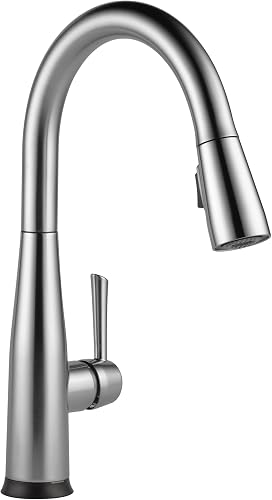 Best for flexible shared kitchens
Delta Essa Touchless (Brushed Nickel)
Touch vs touchless kitchen faucet: how does each work?
Touch control starts or stops water when you tap the faucet; touchless control responds when you move a hand near its sensor. Both styles in this comparison also include a handle for manual control.
The Delta Essa Touch responds to a touch on the spout with a wrist or forearm. Its single lever sets water temperature, and a TempSense LED changes color to reflect the temperature.
The Moen Arbor Touchless uses a motion-activated sensor. The Delta Essa Touchless offers three choices: move a hand near the faucet, tap its surface, or use the standard handle.
Electronic activation doesn't remove the need to understand the handle. Set the temperature with the lever, then follow the model instructions for how touch or sensor activation behaves with that setting.
The Delta Touch2O guide explains the touch approach in more detail. For sensor operation, see how Moen MotionSense works.
Which control works best with messy hands?
Touchless activation avoids touching the faucet to start water, while touch lets you tap the spout with a wrist or forearm. Choose the movement that is easiest when you're cooking or cleaning.
A sensor can be convenient when your hands are covered in dough or sauce because you can move a hand near it instead of gripping the handle. The Moen Arbor and Delta Essa Touchless both offer this type of activation.
Touch control also avoids the need to grasp the handle each time. The Delta Essa Touch responds to contact on the spout, so you can use your wrist or forearm when your fingers are messy.
You'll still need the handle for manual control, including setting the temperature. Check that it's easy to reach and that everyone who uses the sink understands how the electronic control works.
Who should choose touch activation?
Choose touch if a quick tap on the spout feels more predictable than waving near a sensor. It suits cooks who want electronic activation but prefer a clear point of contact.
The Delta Essa Touch is the direct fit among these options. It has touch activation on the spout, a manual lever, a pull-down sprayer, and a temperature indicator light.
Touch can be a poor fit if you don't want to touch the faucet at all while handling food. It may also be less convenient if other people in the household are likely to forget that the spout responds to contact.
If those limits matter, consider a sensor model or a combination faucet. A combination control gives you a second electronic method when one motion isn't convenient.
Who should choose touchless activation?
Choose touchless if you want to start water by moving a hand near a sensor. It suits households that value hands-free activation and are comfortable learning where the sensor responds.
The Moen Arbor is a sensor-first option with a manual handle. It includes 6 AA batteries and also allows optional AC power, so you can plan around the power arrangement that works for the installation.
The Delta Essa Touchless suits a shared kitchen where people may prefer different activation methods. It supports touchless, touch, and handle control, which gives each person a way to operate it.
Skip a sensor model if you want the fewest electronic controls or don't want to manage its power setup. If you prefer tapping one known spot, the touch-only Essa is simpler.
For more sensor choices, see our guide to the best motion sensor kitchen faucets. It can help you compare options beyond the two Delta Essa controls and Moen Arbor here.
How do you choose between the three controls?
Choose the Delta Essa Touch for touch and handle control, the Moen Arbor for sensor and handle control, or the Delta Essa Touchless for all three methods. Start with the motion you'll use most, then check fit and power.
If you already know a wave near the faucet is your preference, the Moen Arbor keeps the electronic choice focused on its motion sensor. Its manual handle remains available for ordinary control.
If you'd rather tap the spout, the Delta Essa Touch pairs that action with a manual lever. Its TempSense indicator can help you check the water temperature from across the room.
If this is a busy shared sink, the Delta Essa Touchless gives people more ways to start water. That flexibility may not be worth choosing if you only expect to use one method.
Read our Delta Essa Touch review for more about the Delta control style. For other layouts and faucet types, start with our plain guide to kitchen sink faucets.
What should you check before installation?
Check the power method, sink holes, deck plate, and installation instructions before you buy. These details can rule out an otherwise suitable faucet.
All three faucets are designed for single-hole installation. The Delta Essa Touch and Touchless can also fit 3-hole installations with 8 in centers when using the included optional deck plate.
The Moen Arbor includes a deck plate and is designed for a single-hole installation, with compatibility for 3-hole sinks. Measure your sink and countertop holes, then confirm the plate fits the layout.
The Moen Arbor includes batteries and allows optional AC power. The Delta Essa models use electronic parts, but confirm their power requirements in the model instructions before planning the installation.
Clear space under the sink for the control parts and connections, and make sure the shutoff valves are reachable. If you're replacing a faucet, take a photo of the existing connections and check that the new model's instructions match your setup.
Our guide to installing a kitchen faucet covers the basic process. Follow the faucet's own instructions for wiring, connections, and activation.
How do you use and care for an electronic faucet?
Use the handle to set a comfortable temperature, then use the touch or sensor control to start and stop water as intended. Keep the activation area clear and follow the model's care instructions.
For a touch faucet, use a wrist or forearm on the spout when your fingers are messy. For a sensor faucet, move your hand near the sensor as directed rather than repeatedly waving across the whole faucet.
Wipe the faucet with a soft cloth and a cleaner suitable for its finish. Avoid harsh tools or cleaners unless the manufacturer says they're safe, and keep water away from any electronic components during cleaning.
If sensor response changes, check the instructions and confirm the sensor area is clean and unobstructed. For battery-powered models, replace batteries according to the manufacturer's guidance rather than assuming every faucet uses the same battery type or schedule.
Don't use touch or sensor activation as a substitute for setting the handle temperature. If children or guests use the sink, show them where the control responds and how to use the lever.
What mistakes should you avoid when choosing?
The most common buying mistakes are ignoring sink fit, assuming every electronic faucet has the same power setup, and choosing a control style that doesn't suit your routine. Check those points before comparing finish or appearance.
Don't assume that a single-hole faucet will cover every extra hole without its deck plate. Confirm the number and spacing of the sink holes, whether a plate is included, and whether the plate matches your layout.
Don't assume that all sensor faucets work the same way. The Moen Arbor uses a motion sensor, while the Delta Essa Touchless offers both touchless and touch activation, so the operating choices differ.
Don't buy a touchless faucet solely because it sounds convenient if you prefer a physical tap. And don't choose a touch faucet if your main goal is to avoid touching the faucet surface.
Finally, don't overlook the manual handle. It's the common control for setting temperature and gives you a familiar way to operate each of these models.
Are touch and touchless faucets worth it?
They are useful when you often want to start water without gripping the handle, and the added controls make sense for your kitchen. If you rarely need that convenience, a standard faucet may be a better match.
Touch suits you when a tap on the spout feels easy to remember and use. Touchless suits you when moving a hand near the sensor feels more natural, while a combination model gives you both electronic choices.
Before deciding, confirm the mounting fit, power setup, and instructions for the exact faucet. Our touch and sensor faucet guide covers the main control styles.
For the touch vs touchless kitchen faucet decision, pick the Delta Essa Touch for a straightforward tap, the Moen Arbor Touchless for sensor-first use, or the Delta Essa Touchless if you want touch, sensor, and handle controls together.
Delta Touch2O and Moen MotionSense explain their faucet control technologies.
Frequently asked questions
Is a touch or touchless kitchen faucet better?
A touch faucet suits you if you want to tap the spout with a wrist or forearm, while a touchless faucet suits you if you want to move a hand near a sensor. A combination model gives you both options.
Keep the manual handle available for ordinary flow and temperature adjustments.
Do touchless kitchen faucets turn on by themselves?
A touchless faucet responds to its sensor, so placement and how you move near it matter. Read the instructions for the exact model and use its handle when you want manual control.
If you share the sink, explain where the sensor activates so others know how to use it.
Do touch kitchen faucets need batteries?
Power needs depend on the faucet model, so check its installation instructions before buying. The Moen Arbor 7594EWSRS includes 6 AA batteries and offers optional AC power.
Don't assume another touch or touchless faucet uses the same power setup.
Can you turn a touchless faucet on with its handle?
Many touchless models also have a manual handle, including the Moen Arbor 7594EWSRS and Delta Essa Touchless. The handle can control water without relying on a hand motion near the sensor.
Confirm the exact model's controls and installation instructions before choosing.
What should you check before installing an electronic faucet?
Check the faucet's power method, mounting holes, deck plate, and instructions before installation. A single-hole faucet may fit a sink with more holes when its optional deck plate is included, but confirm the plate suits your sink.
Shut off the water before working on the existing faucet.


